


 |
 |
Rob's PalmPilot pages |
Updated March 13, 2001 |
Easter Eggs
FAQ's
Favorite Add-Ons
Guestbook
Hardware Hacks
Information Sources
Link Partners
NiMH's
PDA News Ticker
Pilot Sightings
Reviews
-HotPrint

-Weatherguide
SEARCH
Software:
-AppList
-DateList
-Ram Hog
-rPremium
Tips & Tricks
Top 10 Reasons
- to buy a Pilot
Wish List
Main Page
HotPrint (03/2001):
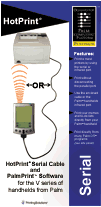
| HotPrint from Handheld Printing
Solutions is a cable and software package that
allows you to print from your Palm to almost any
PC printer. There are packages for the Palm III,
V, and VII series handhelds. The box includes a
HotPrint 12-ft. Serial Cable, a 25-pin Adapter,
the PalmPrint software from Stevens Creek Software, and a PalmPrint User
Guide. You can print from your Palm directly to a printer using the handhelds infrared port to the printer's infrared port. See the HotPrint website for a list of compatible printers. If the printer your using does not have an infrared port, you can use the Serial Cable if the printer has a serial port. |
 |
What can you print? Memos, To-do's, and anything on the Clipboard using the PalmPrint software. Plus Envelopes and Address Labels from the Address Book using the included SnailMailer application also from Stevens Creek Software. One of the best features of PalmPrint, is that you can print from many third-party applications. Stevens Creek Software has published routines that programmers can use to give their application printing ability for owners of PalmPrint. Check their website (http://www.stevenscreek.com/palm/palmprint.shtml) for the most up-to-date list of programs. At the time of my review, the following applications were compatible with PalmPrint: ChessPad, DayNotez, HanDBase, Handy Randy, Insider, iScribe, JFile Pro, MagicText, Mail/P, MultiMail Pro, OmniSky Mail, On Hand, OneTouch Mail, PatientKeeper, Pendragon Order Forms, PocketRegister, PocketReport, PocketTimer, RaceBase, Satellite Forms, ScorePad, SmartDoc 2.0, SnailMailer, Take An Order, ThinkDB, TimeReport, WardWatch 1.2.5.
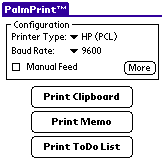 |
The PalmPrint application is the main printing engine and must be installed to 'print-enable' all the applications listed above. The program has a few simple configuration options. The configuration section has a Printer Type pull-down where you choose the type of printer you're using or the printer communication language: Plain Text, Text w/Breaks, HP (PCL), Canon, Epson (ESC/P2), ThinkJet, PostScript, Monarch, Seiko, ESCPOS. The next configuration item is the Baud Rate. The choices are Infrared, Infrared (Fast), Infrared (Slow), 300, 1200, 2400, 4800, 9600, 19200, 38400, 57600. The Infrared settings will make PalmPrint use the IR port on the handheld for printing. The number settings will make PalmPrint use the Serial Port for printing but this should be left at 9600 baud, the default of most Serial printers. There is a Manual-Feed checkbox which will make most printers wait for a paper type to be inserted into the Manual Feed tray. Otherwise, the printer will use the default paper tray. |
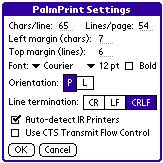
| Clicking
the More button in the Configuration section
opens a new window with many printing options
including Chars/Line, Lines/Page, Margins, Font,
Orientation, Line Termination, Auto-detect IR
Printers, and Flow Control. The font choices are
Courier, Times, and Helvetica. The font sizes
available are 9, 10, and 12 points. You can also
set the font to Bold type. The manual has
recommendations on how to set these options for
certain printers. The menu options in PalmPrint contain only two choices. 'Test IR Communications' will look for an IR printer within range, and report its name if found. If this works you are good to go. If not, you can review the settings and test with different distances. The IR port is effective from a distance of about 4 inches to 20 inches away from the other device. 'About PalmPrint' displays a standard program information window. |
 |
The three buttons in the PalmPrint application allow you to print from the Clipboard, Memo, or ToDo List. That's about all there is to the PalmPrint application itself. The real fun comes when you print from one of the compatible third-party applications.
There are several other sample applications included on the diskette. They are provided at no charge. Mail/P is a modified version of the standard Palm Mail application which allows you to print email messages. SnailMailer allows you to print Envelopes, Address labels and also has a Merge feature that lets you perform a sort of 'mail merge' combining and Address with a Memo.
The Serial Cable is included and is nicely made. It is a quality cable and does not seem home-made in anyway. The included 9-pin to 25-pin adapter allows it to be used on 9-pin or 25-pin serial printers.
Since the software is
available as a trial, you can download the applications
and give them a try yourself ! The suggested retail price
is $39.95
HotPrint - www.hotprint.net
Stevens Creek Software - www.stevenscreek.com
If you feel like buying me a drink please feel free to do so using the button below!
